

Boot up Microsoft® Windows® on High Performance Servers
Choose our Windows® Cloud Compute (WC2) & easily connect with RDP, backed by fully redundant multiple gigabit and low latency networks.

WC2 Pricing
Simple pricing. Kick-start your Windows® project today. Pick a Windows Cloud Compute plan with the resources you need and deploy.
WC2-1
$17.48Per Month, USD
- 2 vCPU Cores
- 4 GB RAM
- 60 GB RAID-10 SSD
- 1 x IPv4 + 3 x IPv6
- 3 TB Bandwidth
- 1 GBps Network
- Enterprise Dell Hardware
- Purchase Plan
WC2-2
$32.90Per Month, USD
- 2 vCPU Cores
- 8 GB RAM
- 120 GB RAID-10 SSD
- 1 x IPv4 + 3 x IPv6
- 5 TB Bandwidth
- 1 GBps Network
- Enterprise Dell Hardware
- Purchase Plan
WC2-3
$62.75Per Month, USD
- 4 vCPU Cores
- 16 GB RAM
- 240 GB RAID-10 SSD
- 1 x IPv4 + 3 x IPv6
- 8 TB Bandwidth
- 1 GBps Network
- Enterprise Dell Hardware
- Purchase Plan
WC2-4
$125.75Per Month, USD
- 8 vCPU Cores
- 32 GB RAM
- 500 GB RAID-10 SSD
- 1 x IPv4 + 3 x IPv6
- 10 TB Bandwidth
- 1 GBps Network
- Enterprise Dell Hardware
- Purchase Plan
WC2 Features
Everything you need to run your Windows Cloud operation, along with a
feature-rich control panel to manage your servers with ease.
Remote Reboot
Reboot, boot and shutdown your server any time with just a click of a button
Remote Desktop
Full RDP administrator access giving you complete freedom to manage your server
Pure SSD Storage
Blazing Fast Servers with Enterprise Grade RAID 10 SSDs up to 1Gb/s in read/write speeds
Powerful CPUs
Utilize the full power of Intel Xeon® E5 processors clocked for high speed computing
OS Re-installation
Quickly rebuild your server with a new Operating System and start from scratch
Fully Managed
We are always available online to help you resolve technical problems along with best effort 3rd party app support
Automatic Backups
Say goodbye to data loss risks and enjoy your peace of mind with our reliable automated backups
Cloud Firewall
Create a secure environment to keep your servers safe by controlling traffic with a set of predetermined rules

Backups & Snapshots
Say goodbye to data loss risks and enjoy your peace of mind with our reliable Automated Backups and Snapshots. Using these add-on features, you can set a frequency for your auto backup sessions or capture and restore the current status of your server at any time with snapshots.
Learn More
Remote Desktop
Connect to your Microsoft® Windows® Desktop from anywhere in the world using official Microsoft Applications.
Learn More

Cloud Firewall
Our Managed Firewall lets you control IP based access right through the control panel to make sure that you are safe from unauthorized access to your servers.
Learn More
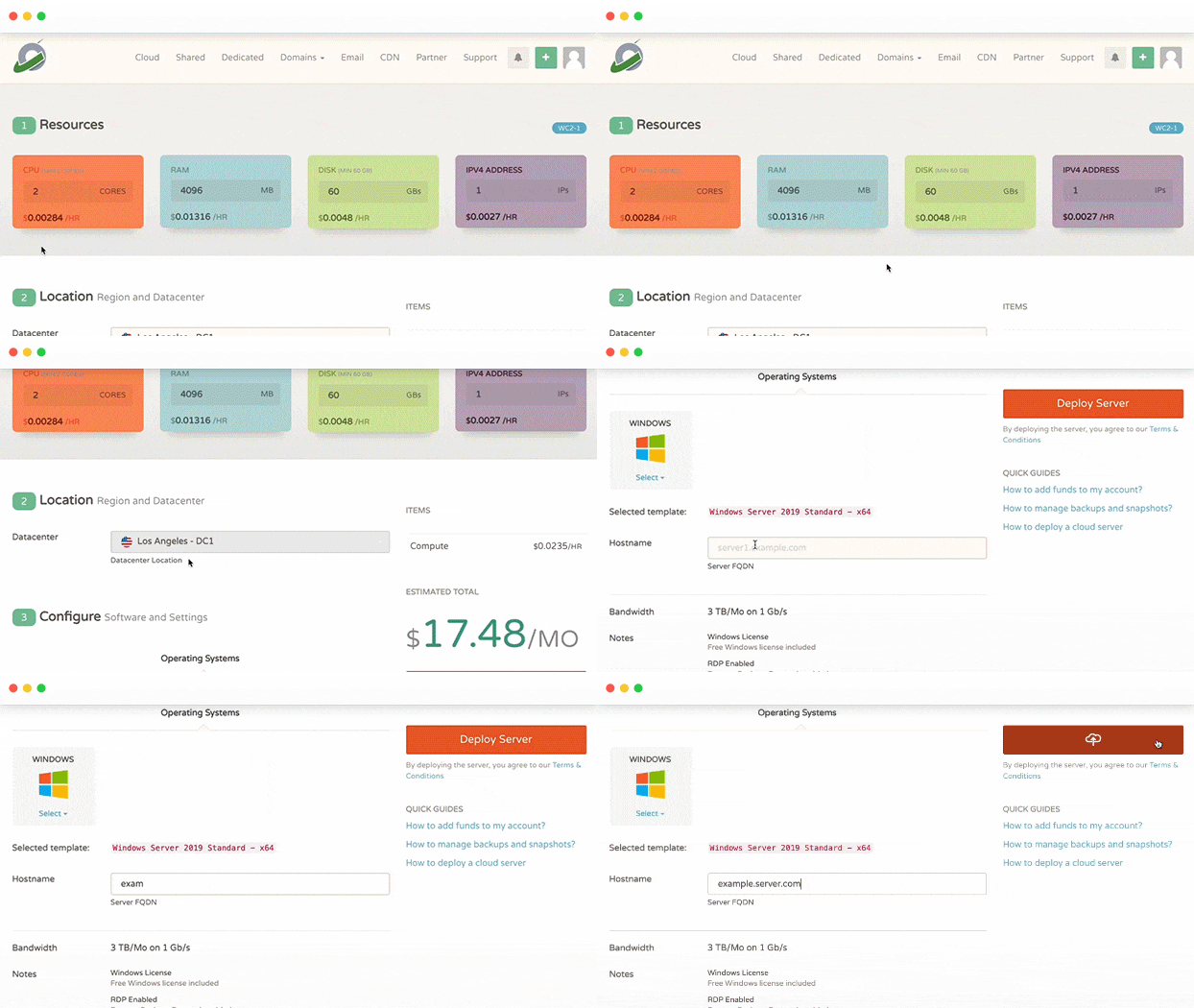
Sign-up to deploy your server
-
Pick your resources
Custom plans available to match your requirements
-
Select features and OS
Pick your prefered windows version & your favoirte applications View OS Library

-
Deploy and boot up
Get online with your new windows instance
Boost productivity in one click
Download popular productivity applications on a Windows optimized server with just one click & kick start your project with a more convenient set-up process.
Want an application?RequestFrequent Questions
A few answers to your questions, feel free to contact us if you have any questions
-
Can I upgrade to a different plan without moving my files?
Yes, you can. If you need to upgrade to a higher plan, it can be done without affecting your existing server files. Just reach out to our 24/7 support team.
-
How can I access my server?
You can access your server using Windows Remote Desktop. Contact our support to learn more.
-
Can I get a custom plan?
Yes, you can get a custom plan. Just contact our 24/7 support team, and we’ll get back to you.